WhatsApp has become an indispensable tool for millions of iPhone users, handling everything from personal chats to business transactions. But if you’ve ever lost your WhatsApp data—whether due to accidental deletion, iOS updates, device damage, or backup failure—you’re not alone.
Fortunately, you don’t need to panic. With a reliable recovery solution, you can get your lost messages, media, and attachments back without hassle. This article shows you how to restore WhatsApp data on iPhone using Gbyte Recovery, a professional-grade software that simplifies the entire process.
Why WhatsApp Data Disappears
Before jumping into the recovery process, it’s helpful to understand why WhatsApp data is so vulnerable. Common causes include:
- Accidental deletion of chats or files
- Incomplete or outdated iCloud backups
- iOS upgrades or factory resets
- Physical phone damage
- Reinstalling WhatsApp without restoring data
While WhatsApp provides an option to back up via iCloud, it’s not foolproof. Many users don’t realize their backup is outdated or disabled until it’s too late.
What Makes Gbyte Recovery Different?
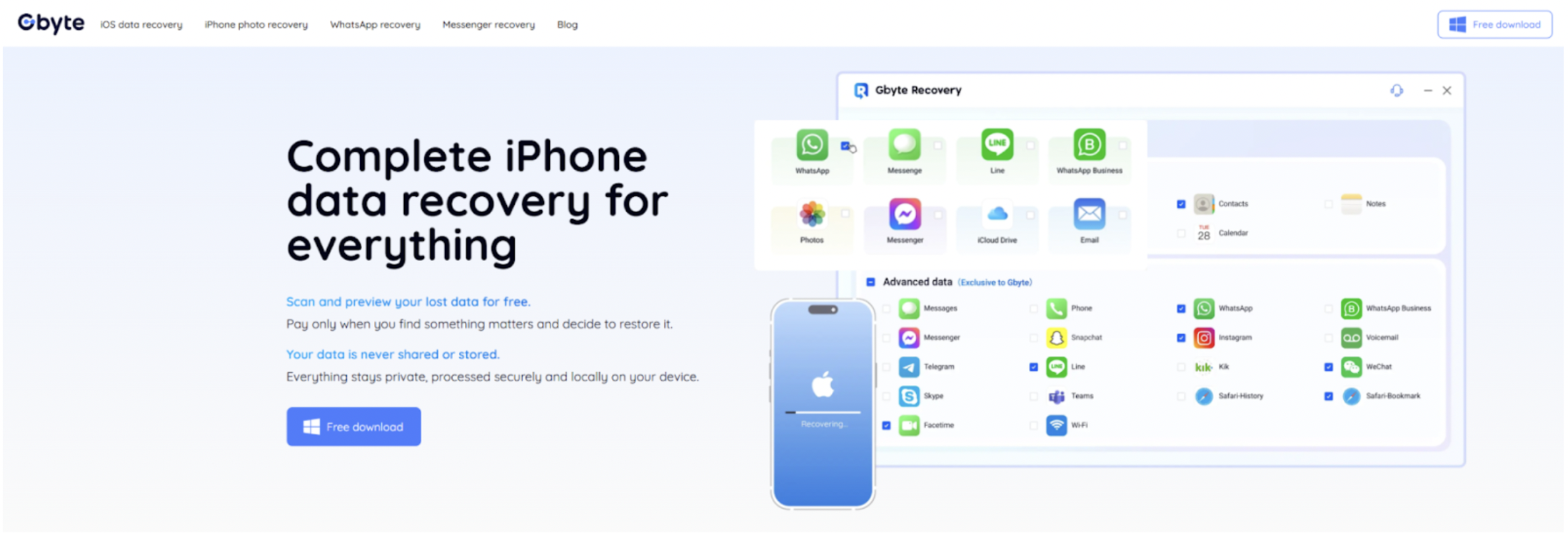
Gbyte Recovery is one of the best data recovery tools, which has received high praise in the market. It is a powerful yet user-friendly program designed specifically for iOS data recovery. What sets it apart is its ability to recover data even without a backup, something most users assume is impossible.
You can explore its full range of WhatsApp-specific capabilities on the Gbyte WhatsApp Recovery feature page, where the company outlines how the tool restores everything from deleted messages to voice notes, images, videos, and document attachments.
A Simpler Recovery Workflow: Just 3 Steps
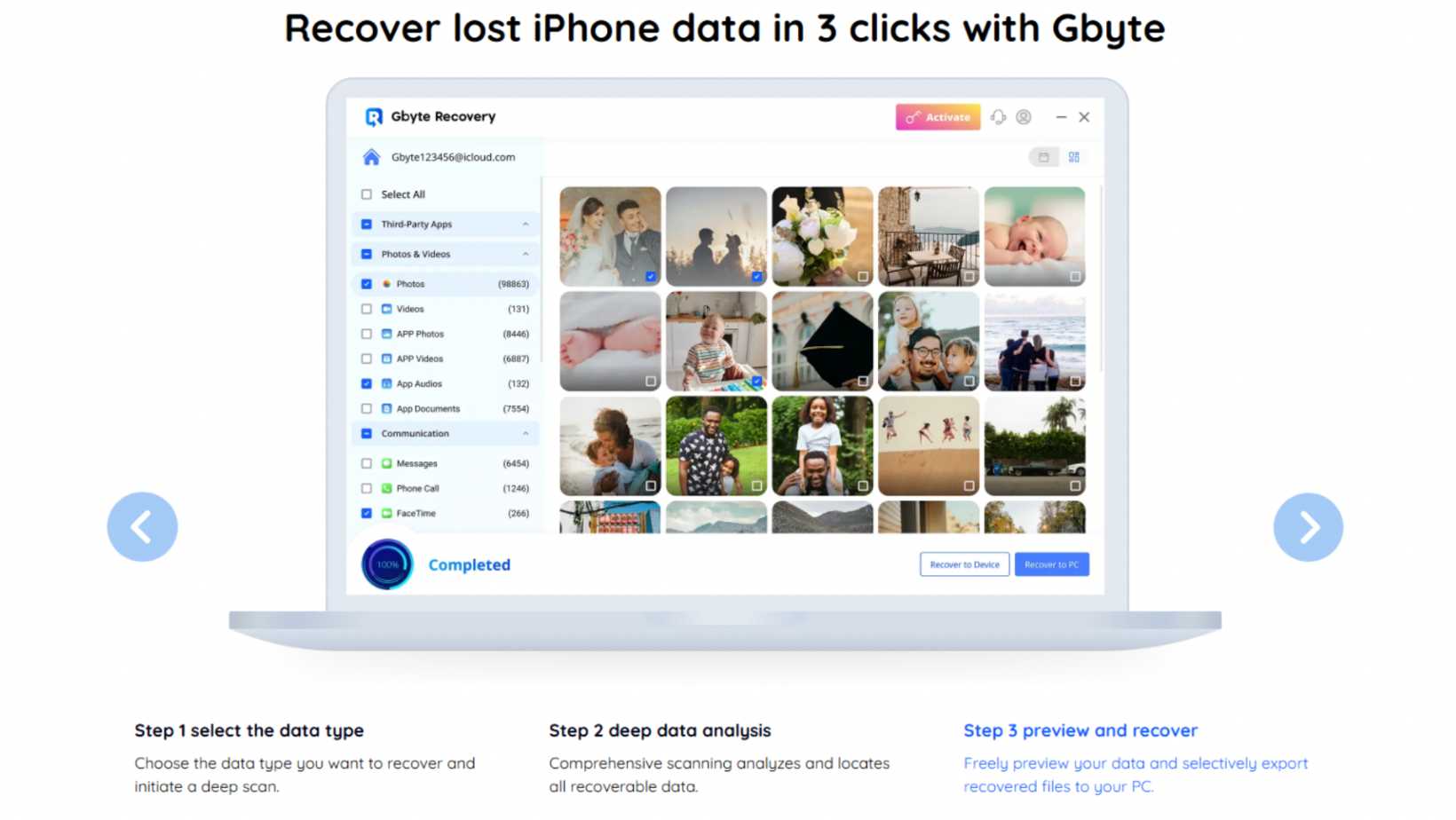
While some recovery tools require complicated backup handling or even full system restores, Gbyte Recovery keeps things straightforward. You can bring back your WhatsApp data on iPhone in just three steps:
1. Download and Connect
Start by downloading and installing the software on your Mac or Windows computer. Open the program, then connect your iPhone with a USB cable. Once your device is recognized, you’re ready to move forward.
There’s no need to jailbreak or adjust hidden system settings—Gbyte is designed for one-click recovery.
2. Select WhatsApp and Log In with Apple ID
On the main interface, choose the recovery mode “Recover from iOS Device” and select WhatsApp as the data type.
To enable deeper access to encrypted WhatsApp data, log in with your Apple ID inside the tool. This ensures the program can correctly scan both local storage and any associated iCloud fragments tied to your WhatsApp account.
3. Scan, Preview, and Restore
Once authorized, click “Start Scan.” Gbyte will thoroughly search your iPhone for deleted WhatsApp chats, media, voice notes, and attachments. Depending on storage size, the scan may take a few minutes.
After scanning, the tool neatly organizes recoverable content by conversations and file type. You can preview everything before restoring, then simply select what you want and hit “Recover.” The chosen data will be exported to your computer, and in some versions, it can even be restored directly into WhatsApp on your iPhone.
Key Benefits of Using Gbyte for WhatsApp Recovery
Unlike generic data recovery tools, you can experience fast and reliable data retrieval with Gbyte Recovery, which restores deleted messages, media, and attachments from your iPhone even without a backup. Gbyte is tailored for WhatsApp recovery for iOS users. Here are the standout features:
🔹 No Backup Required
Many recovery solutions only work if you’ve previously backed up your phone. Gbyte scans the iPhone itself, allowing recovery even if you never enabled iTunes backup.
🔹 Preview Before Recovery
You’re not forced to recover everything. Instead, you can preview messages and attachments, then restore only the items you care about. This saves time and avoids unnecessary clutter.
🔹 Clean and Safe Process
There’s no risk of overwriting current WhatsApp data. The tool doesn’t reinstall the app or delete existing chats—it simply restores lost content to a separate location on your computer.
🔹 Wide Compatibility
Gbyte supports all major iPhone models and iOS versions, including iOS 17 and newer devices like the iPhone 15. No need to worry about compatibility issues.
Real-World Application
Let’s say you accidentally deleted an important WhatsApp conversation with a client. You open WhatsApp only to realize it’s gone. Worse yet, your last iCloud backup was over a month old.
Instead of resetting your phone or hoping Apple support can help, you launch Gbyte Recovery. Within minutes, you’ve scanned the device, previewed the deleted chat, and exported it as a readable HTML or PDF file.
Things to Keep in Mind
While Gbyte Recovery is a highly effective tool, here are a few limitations worth noting:
- The free version only allows preview; full recovery requires a paid license.
- If the deleted data has already been overwritten, recovery may not be possible.
- WhatsApp Business accounts may have slightly lower recovery rates depending on app structure.
- Be sure to stop using your iPhone as soon as you notice data loss to maximize recovery success.
How to Prevent Future WhatsApp Data Loss
Even with powerful tools like Gbyte, prevention is the best strategy. Here are a few quick tips:
- Turn on automatic WhatsApp backups to iCloud.
- Export important chats regularly to your email.
- Avoid third-party cleaner apps that might wipe app data.
- Back up your phone before major iOS updates.
- Use strong passwords and enable 2FA to secure your account.
These habits reduce the chances of ever needing recovery software again—but it’s good to have one like Gbyte as a safety net.
Final Thoughts
WhatsApp data loss can feel devastating, but it doesn’t have to be permanent. Whether you’ve lost business conversations or cherished personal messages, the Gbyte Recovery Tool offers a streamlined, secure, and highly effective solution.
Its no-backup-required recovery, selective restore options, and clean UI make it suitable for any iPhone user—tech-savvy or not.
If you’re facing WhatsApp data loss, Gbyte is one of the best chances you have to get everything back—quickly, safely, and stress-free.
-
NEWSLETTER
 Subscribe for our daily news

Most Popular